People and screens · Live updates
Bridge and live updates
How one protocol connects every app to the console, and how a change on one screen reaches every other screen in under a second.
In one minute
The bridge is one protocol between a small app (a scorer desk, the games console) and the admin panel that hosts it. The app never calls omnium itself. It sends messages like read, watch and command to the panel, and the panel calls the admin service with the signed-in person's login. This part is built and in use. In the plan, the panel's command messages are run by the command service (Section 4, L15); reads and watches stay with admin-api.
Live updates today work, but each open screen asks the database for news once a second, on its own. That is about 70 to 80 queries a minute for a screen that shows nothing new. An update only says "something changed, read again", so every screen then re-reads. And a stream that gets an error answer can stop for good, with no sign on the screen.
The agreed design turns this around. Postgres tells each server the moment a change is saved (pg_notify, woken 0.20 ms after commit, measured). Each server reads the new changes once, works out each watched view once, and pushes the new value with a version number to every screen that watches it. A screen that sees a skipped number re-reads one record. The client reopens the stream after any close.
Targets: another staff screen updated within 1 s of a save, a second scorer within 0.5 s. Database load stays the same for 5 or 500 open screens. None of the agreed design is in the code yet.
What this part does
This part answers one question for every open screen: is what I show still true? When one person changes something, every other screen showing it must update quickly. That means a second scorer on the same match, an operator on the schedule, and the console on the medal table.
The user's own words, from the review of Section 7: when two scorers are scoring, the second one's screen should update as soon as the first changes something.
Section 8 answered five questions:
| # | Question | What goes wrong if we answer it badly |
|---|---|---|
| 1 | How fast must another screen show a change? | A second scorer works on an old view and taps on top of it |
| 2 | Does the server ask the database again and again, or is it told? | Every open screen adds database load, even idle ones |
| 3 | Does an update carry "read again", or the new value itself? | One ball makes every console re-read a whole schedule day |
| 4 | How does a screen know it missed nothing? | A lost update cannot be noticed today |
| 5 | What happens to a screen with old code, or a broken stream? | A screen can stop updating for good, silently |
The bridge in one table Built today
The bridge is the one road between an app and omnium. An app runs in an iframe (a page inside the console page). The console is the host. The app and the host talk with postMessage, and only the host talks HTTP to the admin service.
| Message | From | What it does |
|---|---|---|
ready then hello | app, then host | The app says its protocol and version; the host answers with the session: who, which subject, which reads and commands are offered |
read | app | One read of a named read model, for example games.schedule_day |
watch / unwatch | app | A read model now and whenever it changes; the host sends push messages with new values |
command | app | One change, sent through the workflow engine; see Commands |
state | app | Small saved app state with a version (for example a desk's layout) |
open | app | Ask the console to open a fixture, a player, a run or an integration |
theme, session, session:end | host | Light or dark, a fresh session, or "you are signed out / please update" |
The message types are in packages-ts/omnium-bridge/src/protocol.ts:124-169. The protocol number is PROTOCOL = 1 (protocol.ts:8). The package is published as @fanos/omnium-bridge 1.0.0; the admin panel in the repo uses its source directly.
How it works
The drawing shows today on the left and the agreed design on the right.
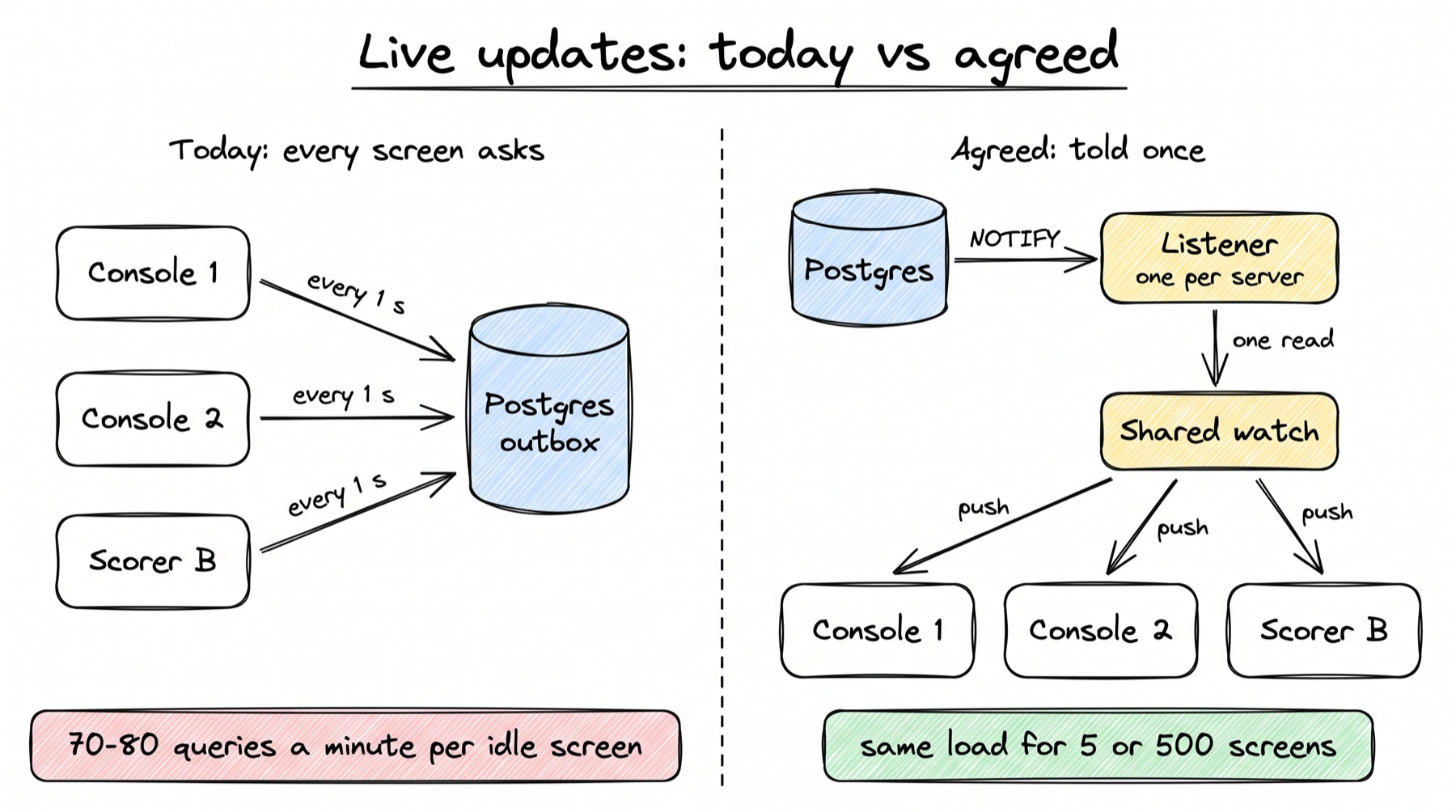
Today Built today
- A command saves its change and one outbox row. The outbox is the
domain_eventtable. The row is written in the same transaction as the change, so it exists exactly when the change does. - Each open screen has its own stream. The admin service runs
GET /stream/changesfor each screen. Once a second it reads newdomain_eventrows, up to 500, and filters them in Python by event or by fixture. - The stream sends "these areas changed". A frame names areas like
fixtureormedals, not data. - The host waits 250 ms, then re-reads. It re-reads, one after another, every watch whose areas were touched. It pushes a new value to the app only if the value changed.
- The stream ends itself after 10 s. A proxy on AWS cuts every request at 15 s, so the server hangs up first. The browser dials again with its last place.
Agreed design Agreed, to build
- Told, not asking. Every command transaction ends with
pg_notify('omnium_change', outbox_id). Postgres delivers it only when the transaction commits. - One listener per server container. Each container keeps one dedicated connection that has run
LISTEN omnium_change. A wake-up arrives 0.20 ms after the commit (median, measured). - One read per container. On a wake-up, the container reads the new outbox rows once, for all its screens, with the late-commit-safe reader from Section 4 (L9). A safety read runs every 5 s in case a wake-up was lost.
- Shared watches. A screen tells the server what it watches: a read model and its parameters. The server keeps one copy per distinct watch, not one per screen. Fifty consoles on one schedule day are one watch.
- Push the value. When a change touches a watch, the server works it out once and pushes the new value to every screen watching it. No screen has to read again.
- Narrow updates. A read model says which record each row comes from. A change to one match updates that match's row, not the whole day.
- A version on every value. A screen that holds version 41 and receives 43 knows it missed 42, and re-reads that one record.
- A stream that never goes quiet. The client reopens the stream after any close, including an error answer. Heartbeats come every 15 s, and they carry the deployed app version and the bridge protocol version.
A worked example
Example · Two scorers on one volleyball match, and a console on the schedule
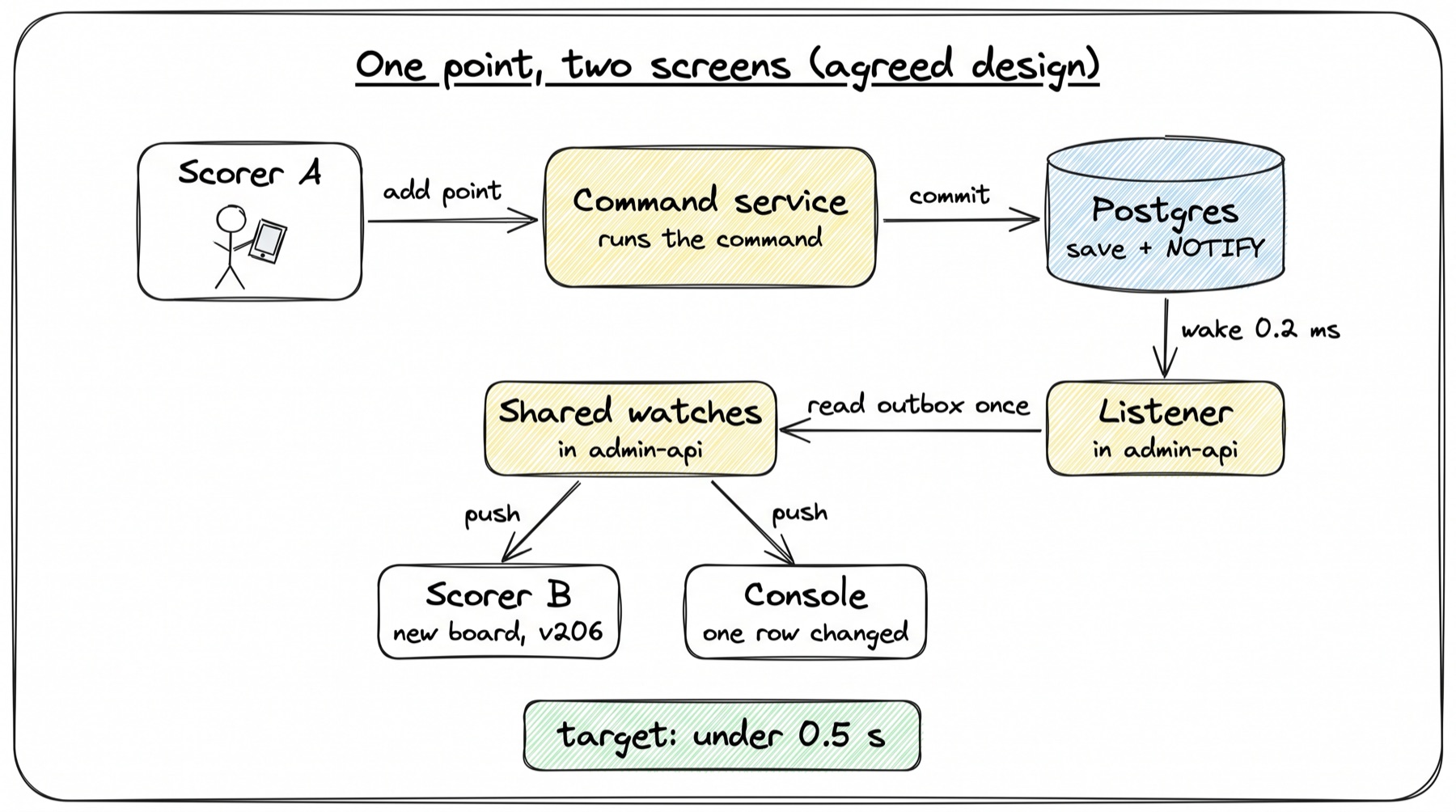
Example values. Scorer A and scorer B both have the volleyball desk open on the same match. Scorer B's app watches the desk's board read (<desk>.board), at version 205. A console operator has the day's schedule open (games.schedule_day). Scorer A records a point for the home side.
Today (built). Times are counted from the commit. "From the code" means the number is a constant in the code, not a measurement.
| Step | What happens | Time after commit | Source |
|---|---|---|---|
| 1 | The command commits. Outbox row 88412 is saved with touches: ["fixture"] | 0 | pipeline.py:971-979 |
| 2 | Scorer B's stream, on its next poll, reads rows after its place and finds 88412 | 0 to 1 s | from the code, _POLL_SECONDS = 1.0 |
| 3 | The stream sends event: changes with the area fixture | same poll | bridge.py:826-856 |
| 4 | Scorer B's host waits for more changes to arrive together | plus 250 ms | from the code, host.ts:196 |
| 5 | The host re-reads the board over HTTP and pushes it to the app | plus one read | not measured |
| 6 | The console's stream does steps 2 to 4 on its own, then re-reads every watch that depends on fixture: the schedule day, the day list, the event and the choices, one after another | 0.25 to 1.25 s plus four reads | from the code; reads not measured |
If scorer B's stream was in its 10 s hang-up at that moment, add up to 1 s more (_RETRY_MS = 1000). Between changes, each of the three screens still runs about 70 to 80 queries a minute.
Agreed design (to build).
| Step | What happens | Time after commit | Source |
|---|---|---|---|
| 1 | The command commits. The same transaction ran pg_notify('omnium_change', '88412') | 0 | design, G1 |
| 2 | Each admin container's listener wakes | 0.20 ms median, 0.53 ms p99 | measured on a laptop, 6 Oct, 500 tries |
| 3 | Each container reads the outbox once from its place, and finds 88412 for fixture X | one query | not measured |
| 4 | The shared watch "board of fixture X" is touched by record id. It is worked out once | one read | not measured |
| 5 | It is pushed as event: value with version 206 to scorer B (and to scorer A) | network | not measured |
| 6 | The watch "schedule day" lists fixture X among its records. Only that one row is worked out and pushed to the console | one narrow read | design, G6 |
| 7 | Scorer B's screen holds 205 and receives 206: no gap, so it applies the value. The point glows for a second | design, B5 |
The target is under 0.5 s for scorer B and under 1 s for the console (B8). That is an estimate from the measured parts, to be proven by the Section 12 live tests. Scorer B's next tap carries the new event number, so it cannot be applied on top of an old view (Section 4, L17).
If scorer B had received 207 instead, it would know it missed 206. The screen would show "Catching up" and re-read that one record.
Low-level design
The code below is real unless it is marked "Agreed design, not in the code yet". How commands themselves are written is on Writing a workflow in code.
The outbox row Built today
Every accepted command writes one domain_event row in its own transaction. The scoring pipeline does it here:
# packages/core/src/omnium_core/scoring/pipeline.py:971-979
jobs_outbox.emit(
    session,
    jobs_outbox.COMMAND_ACCEPTED,
    sport_id=fixture.sport_id,
    competition_id=fixture.competition_id,
    fixture_id=fixture.id,
    seq=item.seq,
    payload={"command": code, "touches": ["fixture"]},
)
And the workflow engine (Games operations, Results) does it here:
# packages/core/src/omnium_core/workflows/engine.py:171-188
jobs_outbox.emit(
    session,
    jobs_outbox.COMMAND_ACCEPTED,
    sport_id=fixture.sport_id if fixture is not None else None,
    competition_id=fixture.competition_id if fixture is not None else event.id,
    fixture_id=fixture.id if fixture is not None else None,
    seq=item.seq,
    payload={
        "command": code,
        "workflow": workflow.code,
        "actor": actor.name,
        "event": str(event.id),
        # What a host re-reads for it: only watches that depend on these.
        "touches": touches(report.kinds),
    },
)
In plain words:
emit(packages/core/src/omnium_core/jobs_outbox.py:44) only callssession.add. The row is saved by the caller's commit, so a rolled-back command leaves no row.touchesis a list of areas:fixture,medals,entries,integration. A scoring command always says["fixture"]. The engine works the areas out from the kinds of records the command wrote (workflows/records.py:94). If a kind is unknown, it saysNone, which means "re-read everything".- The table is
domain_event(model inpackages/contract/src/omnium_contract/models/scheduler.py:26). Columns used here:id(big serial),kind,competition_id,fixture_id,seq,payload(JSONB). It is insert-only and pruned after 30 days.
Today's stream: one polling loop per screen Built today
The constants first:
# packages/admin/src/omnium_admin/routers/bridge.py:766-771
_POLL_SECONDS = 1.0
_KEEPALIVE_POLLS = 15
_TREE_POLLS = 60
#: How soon a browser dials again after a stream ends. Short, because a stream
#: now ends on purpose every few seconds and the gap is time with no updates.
_RETRY_MS = 1000
The loop that runs for each open screen (trimmed):
# packages/admin/src/omnium_admin/routers/bridge.py:901-958 (trimmed)
async def body() -> AsyncIterator[bytes]:
    cursor = start
    polls = 0
    ends_at = clock.time() + limit if limit > 0 else None
    yield f"retry: {_RETRY_MS}\n: connected\n\n".encode() + _place(cursor)
    while True:
        async with factory() as session:
            if event_row is not None and polls % _TREE_POLLS == 0:
                ids = (await session.execute(subjects.event_tree(event_row.id))).scalars()
                tree = {*ids, event_row.id}
            rows = (
                await session.execute(
                    sa.select(DomainEvent.id, DomainEvent.kind, DomainEvent.fixture_id,
                              DomainEvent.competition_id, DomainEvent.payload)
                    .where(DomainEvent.id > cursor)
                    .order_by(DomainEvent.id)
                    .limit(500)
                )
            ).all()
        polls += 1
        if rows:
            cursor = int(rows[-1].id)
            changes = [c for c in map(_as_change, rows) if wanted(c, ...)]
            if changes:
                yield _frame(cursor, changes)
        ...
        if ends_at is not None and clock.time() >= ends_at:
            yield _place(cursor)      # hang up before the proxy does
            return
        if not rows:
            await asyncio.sleep(_POLL_SECONDS)
What each part does, and what it costs:
- One query a second per screen.
DomainEvent.id > cursorwithLIMIT 500runs every second, even when nothing changed. - Every screen reads every row. The query has no filter for the screen's event or fixture.
wanted()(bridge.py:795) drops the rows the screen does not need, in Python, after they were read. During a big import every screen reads every row. - The event tree. For an event screen, the loop reads the list of competitions under the event when
polls % 60 == 0. Becausepollsstarts at 0 in each new stream, and a stream lasts 10 s, this read runs at the start of every stream, so about every 10 s. - The 10 s hang-up.
ends_atcomes fromstream_max_seconds. Each new stream also checks the login and looks up the event by code. - Late commits are skipped.
id > cursorassumes ids commit in order. They do not: a transaction that took id 100 can commit after one that took id 101. Once the cursor passed 101, row 100 is never sent. Section 4 (L9) agreed a late-commit-safe reader. - Keepalive. A
: keepalivecomment is sent every 15 polls. With 10 s streams, this line is not reached (from the code, not tested).
Counting from the code, an event screen that sees no changes runs, per 10 s stream: about 10 outbox reads, 1 tree read, 1 login check and 1 event lookup. That is about 13 queries per 10 s, or about 78 a minute. The design doc rounds this to 70 to 80 a minute. A fixture screen skips the tree and event reads.
The frame it sends carries areas and places, not data:
# packages/admin/src/omnium_admin/routers/bridge.py:826-856 (trimmed)
def _frame(seq: int, changes: list[dict[str, Any]]) -> bytes:
    body = {
        "seq": seq,
        "changes": [
            {"seq": change["seq"], "kind": change["kind"],
             "fixtureId": ..., "competitionId": ...,
             "workflow": change["workflow"], "command": change["command"],
             "touches": change["touches"]}
            for change in changes
        ],
    }
    return f"event: changes\nid: {seq}\ndata: {json.dumps(body)}\n\n".encode()
seq here is the stream's place in the outbox, not a version of any record. A screen cannot tell from it that it missed a value.
Why the stream ends after 10 s Built today
# packages/core/src/omnium_core/settings.py:259-267
# --- The admin panel's live stream (/stream/changes) ---------------------
# How long one stream stays open before the server ends it and the browser
# dials again, carrying on from the last change it saw. 0 keeps it open.
#
# Not 0 by default because of AWS: admin-api sits behind ECS Service Connect,
# whose proxy ends EVERY request after 15 seconds unless the service sets a
# timeout. A stream cut there shows "Reconnecting" and can drop a change.
# Ending first, cleanly, avoids both. Set 0 once that timeout is lifted.
stream_max_seconds: float = Field(default=10.0, ge=0)
The agreed design raises the per-request timeout on the admin service and sets stream_max_seconds = 0 (G5). The infra change is tracked in Section 14 (Deploy).
Today's client: the browser side Built today
The bridge's HTTP client opens the stream with the browser's EventSource:
// packages-ts/omnium-bridge/src/http.ts:244-257
changes(onChange) {
  const live = { event: options.live?.event, fixture: options.live?.fixture };
  const Source =
    options.EventSource === undefined
      ? (globalThis as { EventSource?: EventSourceConstructor }).EventSource
      : options.EventSource;
  if (Source) {
    // A browser's EventSource cannot send a header, so the token rides in
    // the address — for this one route only.
    const stream = new Source(
      `${base}/stream/changes` + query({ ...live, access_token: options.token?.() }),
    );
    stream.addEventListener("changes", (event) => onChange(touchesOf(event?.data)));
    return () => stream.close();
  }
  // ... otherwise poll with ?once=true every 20 s
The host turns "areas changed" into re-reads:
// packages-ts/omnium-bridge/src/host.ts:188-228 (trimmed)
changed(touches: string[] | null = null): void {
  if (touches === null) this.everything = true;
  else if (touches.length === 0) return;
  else for (const area of touches) this.touched.add(area);
  if (this.settleTimer) clearTimeout(this.settleTimer);
  this.settleTimer = setTimeout(() => {
    this.settleTimer = null;
    void this.refresh();
  }, this.options.settleMs ?? 250);
}

refresh(): Promise<void> {
  ...
  for (const [watchId, watch] of [...this.watches]) {
    if (!everything && watch.depends && !watch.depends.some((area) => touched.has(area))) {
      continue;
    }
    const { value, depends } = await this.readWith(watch, watch.name, watch.params);
    const text = JSON.stringify(value);
    if (!this.watches.has(watchId) || text === watch.last) continue;
    watch.last = text;
    this.post({ type: "push", watchId, value });
  }
  ...
}
The console wraps EventSource to show the live dot:
// frontend-admin/src/lib/bridge/frame.ts:194-206
constructor(url: string) {
  this.source = new Source(url);
  this.source.addEventListener("open", () => {
    this.settle();
    onState("open");
  });
  this.source.addEventListener("error", () => {
    if (this.pending !== null) return;
    this.pending = setTimeout(() => {
      this.pending = null;
      onState("retrying");
    }, graceMs);
  });
}
In plain words:
- The URL is fixed at the start. The login token is put in the address once. The browser's own reconnects reuse that address, with the same token.
- The re-reads are one after another.
refresh()awaits each watch in turn. A console with four schedule watches does four reads in a row for one ball. - An error only changes the label. After 5 s of error (
RECONNECT_GRACE_MS = 5_000,frame.ts:170), the dot says "Reconnecting". Nothing opens a new stream. By the browser's rules, an answer that is not 200 (an expired login gives 401, a proxy can give 502) closes anEventSourcefor good. So the screen says "Reconnecting" forever and never updates again. - Old code is checked once. The host checks the protocol number only when the app says
ready(host.ts:261-264). The app also sends its own version inready, but nothing compares it, and nothing tells an open app that a new version was deployed.
The wake-up Agreed, to build
Agreed design, not in the code yet. Searching the repo for pg_notify, LISTEN and add_listener in packages/*/src finds nothing today.
-- Agreed design, not in the code yet (from the Section 8 doc).
-- In every command transaction, right after the outbox insert (Section 4):
INSERT INTO domain_event (...) VALUES (...) RETURNING id;
SELECT pg_notify('omnium_change', $outbox_id::text);   -- delivered only if this transaction commits
COMMIT;
The listener, one per admin container:
# Agreed design, not in the code yet: admin/src/omnium_admin/live/listener.py (new)
async def run(dsn: str, on_change: Callable[[], Awaitable[None]]) -> None:
    while True:
        try:
            conn = await asyncpg.connect(dsn)                 # outside the pool, never in a transaction
            wake = asyncio.Event()
            await conn.add_listener("omnium_change", lambda *_: wake.set())
            await on_change()                                  # catch up from the last place after (re)connecting
            while True:
                try:
                    await asyncio.wait_for(wake.wait(), timeout=5.0)   # the safety read every 5 s
                except asyncio.TimeoutError:
                    pass
                wake.clear()
                await on_change()                              # one read for any number of notifications
        except (OSError, asyncpg.PostgresError):
            await asyncio.sleep(backoff())                     # reconnect with growing waits
What matters in it:
- Its own connection, outside the pool. A listener inside a transaction receives no notifications, and a long transaction that listens can hold up Postgres's notification queue.
- The wake-up is only a doorbell. The outbox is the truth. A lost notification costs at most 5 s, because the safety read finds the row anyway.
- Many notifications, one read.
wakeis a flag. Ten commits in one moment cause one read. - Reconnect reads from the last place. After a dropped connection,
on_change()runs before waiting again, so nothing is missed.
Shared watches Agreed, to build
Agreed design, not in the code yet. Today each browser's host keeps its own watches (packages-ts/omnium-bridge/src/host.ts:289-302). In the design, the server keeps them, once per distinct view:
# Agreed design, not in the code yet: admin/src/omnium_admin/live/watches.py (new)
# per container, in memory
watches: dict[WatchKey, Watch]            # WatchKey = (read name, canonical params)
class Watch:
    value: bytes                          # canonical JSON of the last value
    version: int                          # the highest record version inside it
    depends: set[str]                     # areas, as read models declare today
    records: set[uuid.UUID]               # which records it shows, for narrow updates
    screens: set[StreamId]
The rules (G2, G3):
| Rule | Value | Why |
|---|---|---|
| Key | read name plus canonical parameters | Two screens asking the same thing share one watch |
| Touched by | area (depends) and record id (records) | One match change touches only views that show that match |
| Worked out | at most 8 at a time per container | A big import cannot flood the database |
| Pushed | only if the new value differs | No noise for screens |
| Dropped | 30 s after its last screen leaves | A quick reload keeps the watch warm |
| Send queue per stream | at most 100 values | A full queue is cleared and the screen told resync, so one slow browser never slows the others |
| Memory | about 50 MB per container for 1,000 views of about 50 KB | estimate, from the design doc |
Narrow updates need one change to read models (G6). Today the schedule reads say only an area:
# packages/core/src/omnium_core/workflows/reads_schedule.py:295, 338, 392
@read_model("games.schedule_days", depends=("fixture",))
@read_model("games.schedule_day", depends=("fixture",))
@read_model("games.schedule_choices", depends=("fixture",))
So any change to any match re-reads all of them. In the design, each read model also declares which records each row comes from. depends stays. The registry is ReadModel in packages/core/src/omnium_core/workflows/reads.py:52-57.
The new stream Agreed, to build
Agreed design, not in the code yet. /stream/changes (bridge.py:859) is replaced by three routes:
GET  /stream?subject=event:asian-games-2026            -> text/event-stream, first frame: "hello" with stream id, app version, protocol version
POST /stream/{id}/watch   {name, params}               -> {watchId, version, value}   (the first value at once)
POST /stream/{id}/unwatch {watchId}

event: value      id: <outbox place>   data: {"watchId": "w7", "version": 205, "value": {...}}
event: resync     data: {"watchId": "w7"}              -> the screen reads that watch again
event: heartbeat  data: {"app": "2026.10.06-3", "protocol": 2}     every 15 s
How the parts fit:
- Watches are registered over HTTP on an open stream (G4). The stream stays one-way. No WebSockets are needed.
id:is the outbox place. The browser sends it back asLast-Event-IDwhen it reconnects after a network error.versionis per record. It is what lets a screen notice a gap (B5).- The client wrapper reopens after any close (B6, G5). For an error answer, which the browser never retries, the wrapper opens a new stream itself, with a fresh login from the panel and its last place. It then sends its watches again. Waits between tries grow.
- 30 s of silence counts as broken. Heartbeats come every 15 s; two missed heartbeats trigger a reopen.
- Heartbeats carry versions (B7). A newer
appshows a quiet "A new version is ready" banner with Reload. Aprotocolthe old code cannot read shows "Please reload", and the panel stops sending that app's commands.
Changes on the client side, from the design doc's file list:
| File | Change |
|---|---|
packages-ts/omnium-bridge/src/http.ts | changes() becomes stream(): reopens after any close, resends watches, applies value frames |
packages-ts/omnium-bridge/src/host.ts | Stops re-reading watches itself; forwards value frames to the app; asks for a resync on a version gap |
frontend-admin/src/lib/bridge/frame.ts | The live dot gains "Catching up"; reportingEventSource gives way to the reopening stream |
New server files
All new, from the design doc's file list:
| File | Holds |
|---|---|
core/.../outbox/notify.py | notify(session, outbox_id): the pg_notify call, used by the engine right after the outbox insert |
core/.../outbox/reader.py | read_after(): the late-commit-safe read (Section 4), shared with the stats queue |
admin/.../live/listener.py | The listener above: LISTEN, reconnect, the 5 s safety read |
admin/.../live/watches.py | The shared watch map: touch by area and record, work out at most 8 at a time, push, drop after 30 s |
admin/.../live/streams.py | Stream ids, send queues (100), resync, heartbeats with app and protocol versions |
What a screen shows
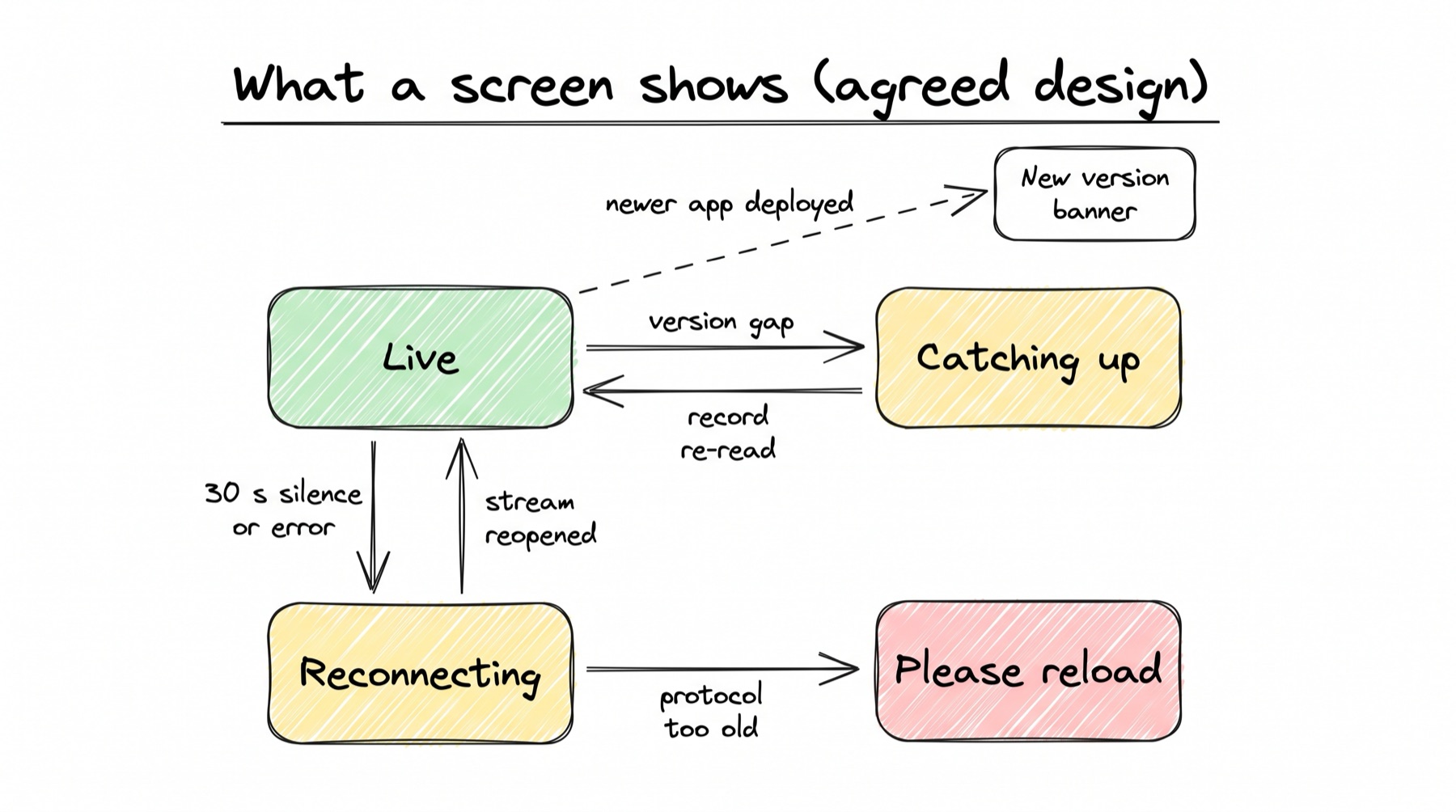
| State | What the person sees | When |
|---|---|---|
| Live | A small green dot by the page title: "Live" | The stream is open and heartbeats arrive |
| Catching up | Amber: "Catching up" | The screen saw a version gap and is re-reading |
| Reconnecting | Amber: "Reconnecting", with the time since the last update | No heartbeat for 30 s; shown only after 5 s, so short blips stay quiet |
| Offline | A bar: "Offline. Showing data from 12:04. Changes will send when you are back" | No network; the app's outbox keeps changes (Section 7, V1) |
| New version | A quiet banner: "A new version is ready" with Reload | A newer app was deployed; waiting changes survive the reload |
| Must reload | "Please reload to keep working" | The bridge protocol changed in a way the old code cannot read |
| Updated by someone else | The changed value glows for a second; on a match page, "Updated by Priya, 12:04" | A push changed a value on screen, never a field being typed in (Section 7, V4) |
Today the dot has four labels: "Live", "Reconnecting", "Connecting" and "Checking every 20 s" when there is no EventSource (frame.ts:151-158).
The public API stream is a different thing
GET /v1/stream in the public API (packages/api/src/omnium_api/routers/stream.py:115-151) is for fans, not staff screens. It subscribes to a Redis pub/sub channel and sends {entity, ids, seq}, with a 15 s heartbeat. Redis pub/sub keeps no replay, so a client that missed a message must re-fetch. It answers 503 when no Redis is set. Section 8 does not change it; fan delivery is on Stats, feeds and delivery.
When things go wrong
Every case ends with each screen showing the latest data, or saying clearly that it cannot.
| What goes wrong | What happens (agreed design) | Decision |
|---|---|---|
| A wake-up is lost (the listening connection dropped for a moment) | The 5 s safety read finds the new outbox rows. Screens are at most 5 s late, never wrong | B1, B2 |
| The listening connection breaks | The container reconnects, runs LISTEN again, and reads everything after its last place | B1, G1 |
| Two commands commit out of id order | The late-commit-safe reader (Section 4, L9) still finds the late one. Today id > cursor skips it for good | B2 |
| A stream gets an error answer (expired login, a proxy's 502) | The client opens a new stream with a fresh login and its last place. Today this screen goes quiet for good | B6 |
| A screen misses one value | The next value's version skips one. The screen shows "Catching up" and re-reads that one record | B5 |
| A screen reconnects to a different container | It sends its watch list again; the new container adds them to its shared watches | B3 |
| A big import changes 1,000 matches | Each container reads the outbox once. Screens watching those matches get their rows; others get nothing. At most 8 watches are worked out at a time | B2, B4, G2 |
| 300 people open the console during a final | Database work stays per container. Each extra screen costs memory and one open connection to the server | B3 |
| One browser stops reading | Its send queue fills at 100, is cleared, and the screen is told resync. Other screens stay on time | G3 |
| A deploy while screens are open | Streams reconnect to the new containers within seconds, from their last place. Apps see "A new version is ready" | B6, B7 |
| A container dies | Its screens reconnect elsewhere and resend their watches. Nothing is lost: the outbox is the truth | B3, B6 |
| An app's code is too old for the new bridge protocol | The panel shows "Please reload" and stops sending its commands until it does | B7 |
| Very many commits a second all send NOTIFY | A commit that sends a NOTIFY takes a global lock in Postgres. Others hit this at "tens of thousands of simultaneous writers" (Recall.ai, in the research notes). Our write rate is far below that (not measured for omnium) | B1 |
Decisions
All 14 decisions are Agreed (closed 6 Oct 2026). None was dropped.
| # | Decision | In plain words |
|---|---|---|
| B1 | Every command transaction sends a NOTIFY with its outbox id; each server container keeps one listening connection, plus a safety read every 5 s | The database wakes the servers within a millisecond of a save, instead of every screen asking every second |
| B2 | Each container reads new outbox rows once, with the late-commit-safe reader (Section 4, L9), for all its screens | Database work no longer grows with the number of open screens |
| B3 | Shared watches on the server: one copy per distinct watched view per container, worked out once per change and pushed to every screen watching it | Fifty consoles on one schedule cost one read |
| B4 | A push carries the new value of the view, not only "something changed"; a match row updates only that row | The second scorer sees the first scorer's ball within about 0.5 s, with no extra read |
| B5 | Every pushed value carries its record's version; a skipped number makes the screen re-read that one record | A screen always knows if it missed something |
| B6 | The client reopens the stream after any close, including error answers, with a fresh login and its last place; the proxy timeout is raised; heartbeats every 15 s | No screen silently stops updating |
| B7 | Heartbeats carry the deployed app version and the bridge protocol version: "A new version is ready" by default, "Please reload" only when the protocol changed incompatibly | Old code is noticed without interrupting someone mid-task |
| B8 | Targets: another staff screen updated within 1 s of a save, a second scorer within 0.5 s, proven in the Section 12 tests | "Live" has a number we test |
| G1 | pg_notify(outbox id) in every command transaction; one dedicated listening connection per container, never in a transaction, reconnecting and reading from its last place | The wake-up can be lost without losing a change |
| G2 | Shared watches keyed by read name and canonical parameters, touched by area and by record id, worked out at most 8 at a time, pushed only if changed, dropped 30 s after the last screen | Work grows with what is watched, not with how many people watch it |
| G3 | Each stream has a send queue of at most 100; a full queue is cleared and the screen told to resync | One slow browser never slows the others |
| G4 | Watches are registered over HTTP on an open stream; values come back on the stream with their version and outbox place | A simple one-way stream; no WebSockets needed |
| G5 | The client wrapper reopens after any close and resends its watches; the proxy timeout is raised and stream_max_seconds set to 0 | No silent screens, no 10 s gaps |
| G6 | Read models declare which records each row comes from, so a change to one match updates only its row | One ball no longer re-reads a whole day |
Built today, or still to build
| Piece | Today | Agreed design | Status |
|---|---|---|---|
| Bridge protocol between app and host | protocol.ts:8 (PROTOCOL = 1), host.ts, app.ts; published as @fanos/omnium-bridge 1.0.0 | Stays; protocol version also goes into heartbeats | Built today |
| Outbox row per accepted command | pipeline.py:971-979, engine.py:171-188, jobs_outbox.py:44 | Stays; a NOTIFY is added after it | Built today |
| Wake-up by NOTIFY | None (no pg_notify or LISTEN in the code) | outbox/notify.py plus one listener per container (B1, G1) | Agreed, to build |
| Reading the outbox | Each screen polls once a second, bridge.py:910-958 | One late-commit-safe read per container (B2) | Agreed, to build |
| Filtering | In Python after reading all rows, wanted() at bridge.py:795 | By area and record id in the shared watch map (G2) | Agreed, to build |
| Watches | Kept in each browser's host, re-read one after another, host.ts:188-228 | Kept on the server, once per distinct view (B3) | Agreed, to build |
| What a push carries | Areas only, _frame at bridge.py:826-856 | The new value and its version (B4, B5) | Agreed, to build |
| Narrow row updates | Schedule reads depend on fixture as a whole, reads_schedule.py:295, 338, 392 | Records per row (G6) | Agreed, to build |
| Reopen after an error answer | Only relabels the dot, frame.ts:200-206 | Client wrapper reopens after any close (B6, G5) | Agreed, to build |
| Stream length | Ends every 10 s, settings.py:267 | stream_max_seconds = 0 after the proxy timeout is raised (Section 14) | Agreed, to build |
| Old code noticed | Protocol checked once at ready, host.ts:261-264; app version not compared | App and protocol versions in every heartbeat (B7) | Partly built |
| Live dot | Live, Reconnecting, Connecting, Checking every 20 s, frame.ts:151-158 | Adds Catching up, New version, Must reload | Partly built |
| Speed targets and tests | None | 0.5 s and 1 s, proven by the Section 12 live tests (B8) | Agreed, to build |
| Public fan stream | Redis pub/sub, api/routers/stream.py | Not part of Section 8 | Built today |
The design doc's build order puts the cheapest big win first:
notify()in the engine after every outbox insert. Harmless while nobody listens.- The listener and the late-commit-safe reader in each admin container, feeding today's
/stream/changes. The per-screen polling stops here. - The client wrapper that reopens after any close (fixes silent screens), and the proxy timeout.
- Shared watches and the new stream routes; the host forwards values instead of re-reading.
- Record keys on the schedule read models (narrow row updates).
- Versions on values, gap detection, the Catching up state.
- App and protocol versions in heartbeats; the "new version" banner.
Numbers
| Number | What | Where it comes from |
|---|---|---|
| 0.20 ms | Median time from a commit to a listener waking | Measured on a laptop, 6 Oct 2026, 500 tries (Section 8 doc) |
| 0.53 ms | 99th percentile of the same | Same measurement |
| 70 to 80 a minute | Queries per idle open screen today | Counted from the code's constants (Section 8 doc); this page's own count gives about 78 for an event screen |
| 3,500 to 4,000 a minute | Queries for 50 idle screens today | The line above times 50 |
| 12 a minute | Safety reads per container in the agreed design | One every 5 s, from the design |
| 1 s, 250 ms, 10 s, 5 s | Poll gap, host wait, stream length, "Reconnecting" grace | From the code: bridge.py:766, host.ts:196, settings.py:267, frame.ts:170 |
| 0.25 to 1.25 s plus re-reads | Today's time from a save to another screen | From the code's constants; re-read times not measured |
| under 0.5 s | Agreed design, save to second scorer | Estimate from the measured parts; to be proven in Section 12 |
| about 50 MB | Memory per container for 1,000 watched views of 50 KB | Estimate, Section 8 doc |
The tests that will prove the design (Section 12):
| Test | Proves |
|---|---|
| Two browsers on one match; one adds a ball | The other shows it within 0.5 s, with no read request in its network log (B4, B8) |
| 200 idle screens open for 5 minutes | Database queries per minute stay flat as screens are added (B2) |
| Kill the listening connection | Screens catch up within 5 s; nothing missed (B1) |
| The stream answers 502 once | The client reopens and carries on (B6) |
| Drop one value frame on purpose | The screen sees the gap and re-reads that record (B5) |
| Change one match on a 900-unit day | Only that row is sent (G6) |
| A slow browser that stops reading | Its queue resyncs; other screens stay on time (G3) |
| Deploy a new app version with screens open | The banner appears; nothing waiting is lost (B7) |
Read next
- Console and scorer apps: the screens that sit on top of this stream, and how they stay fast.
- Commands and the workflow engine: where the outbox row is written, and the late-commit-safe reader.
- Stats, feeds and delivery: the same wake-up drives the stats queue and the feed builder.