People and screens · Console and scorer apps
Console and scorer apps
The screens where staff run an event and fix data, and where scorers score a match: how a change is shown, sent, kept and confirmed.
In one minute
People change omnium data on two kinds of screen. Staff use the console to run an event and fix data. Scorers use scorer apps (we call them desks) to score a match event by event. Both run inside an iframe of the admin panel and talk to omnium only through the bridge, a message protocol between the app and the panel.
Today a change waits for the server, is never retried, and gets a new key on every send. A live update can wipe what someone is typing. The whole console is one 594 KB JavaScript file.
Agreed (Section 7, V1 to V10 and F1 to F7): every app sends through one shared outbox in the browser (IndexedDB). It makes the key once, saves the change before sending, sends one at a time per match, and retries with the same key. A change shows on the screen at once, and every field ends in one of five states: idle, sending, saved, refused or conflict. A field you are typing in never takes a live update. Pages load only their own code, and long lists draw only the rows on screen.
None of the agreed parts is built yet. This page keeps the two apart everywhere.
What this part does
This part is everything a person touches. It decides how a screen shows data, how a change is sent and confirmed, and how the screen stays fast and safe under pressure. A wrong answer here means an operator loses a change, trusts old data, or slows down when speed matters most.
The design section answered seven questions:
| # | Question | Why it matters |
|---|---|---|
| 1 | When does a change show on the screen: at once, or after the server answers? | Waiting makes every click feel slow. Showing it early must never hide a change that failed. |
| 2 | What happens to a change when the network drops? | A person must never lose work, and never send it twice. |
| 3 | How does a screen stay up to date while others change the same data? | Old data leads to wrong fixes. A live update must not wipe what someone is typing. |
| 4 | How does the screen show a conflict or a refusal? | The person must see what changed and what to do, in plain words. |
| 5 | How fast must screens open, with 10,000 players or 600 matches in a day? | Operators work under time pressure during a live event. |
| 6 | How does fast data entry work: keyboard, tab order, one-click actions? | Typing a full scorecard must take minutes, not an hour. |
| 7 | One app or many, and how do scorer apps share the same rules? | Each new app must not build its own sending, retries and conflicts. |
Who uses which screen
| Person | Screen | What they do there |
|---|---|---|
| Operator (staff) | Console: Overview, Schedule, Match page, Medals, Players, Integrations, Runs, Feeds | Run one event: fix a score, a start time, a medal count, an entry; watch imports |
| Operator | Scorecard entry (new) | Type a full scorecard by hand, row by row |
| Admin | Sport releases (new, from Section 6) | Roll out a new version of a sport's rules |
| Scorer | Desk (scorer app) for one match | Score a match event by event: a ball, a punch, a move, a split |
| Viewer | Any console screen, read only | Look, never change |
How it works
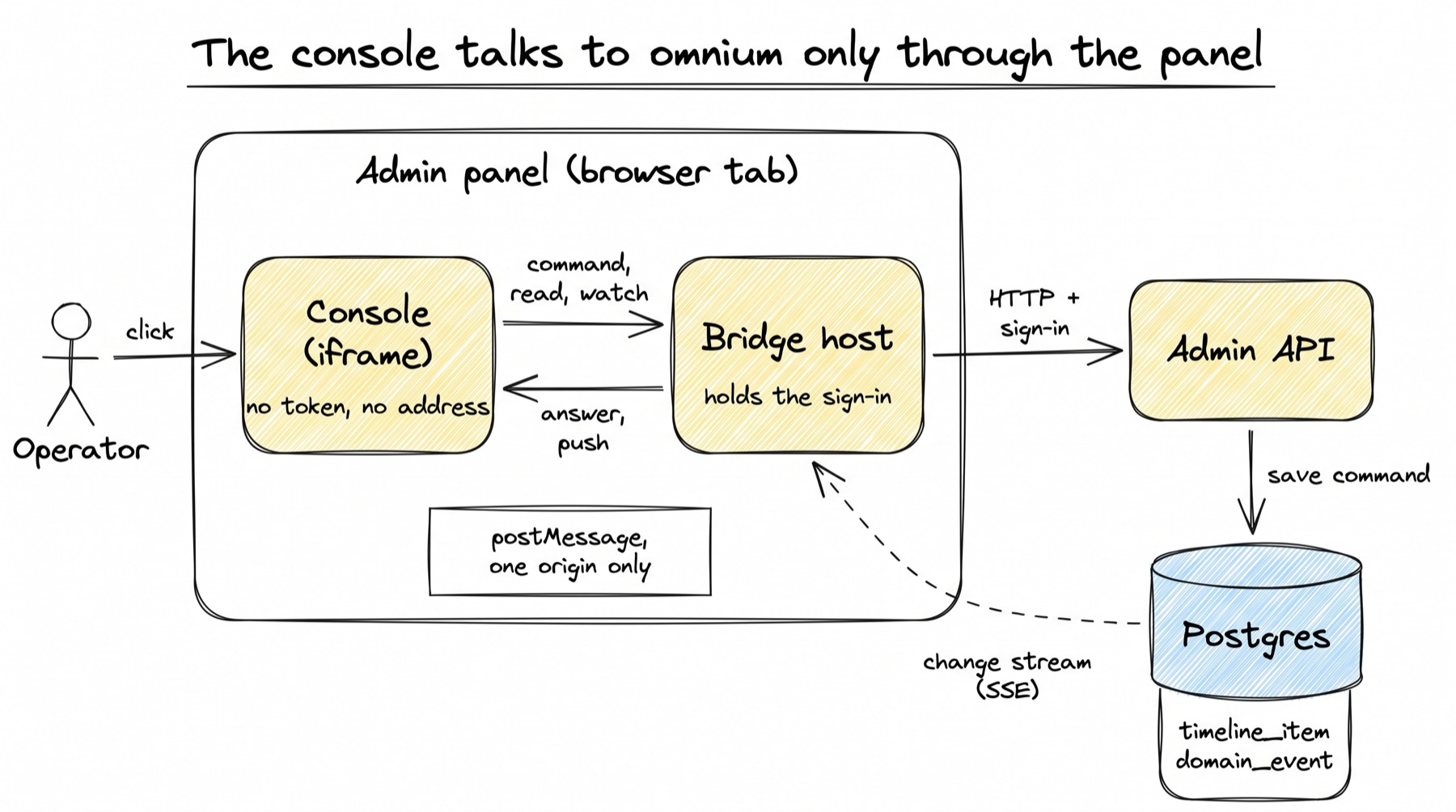
The console and the desks are separate web apps. The admin panel draws each one in an iframe and answers its messages. This is how one change travels today, step by step:
- The panel opens the app. It asks omnium for a session (
GET /apps/session), draws the iframe, and waits for the app to sayready(frontend-admin/src/components/bridge/AppFrame.tsx:286-293). - The handshake. The app posts
ready; the panel answershellowith the session: the event or fixture, the person's name,canWrite, and the read models and commands this app may use (packages-ts/omnium-bridge/src/host.ts:260-268). The app accepts messages only from the origins its build trusts (app.ts:90-116). - The screen reads and watches. A screen asks for a named read model, such as
games.medal_tableorresults.fixture. Most reads are watched: the panel re-reads them when data changes and pushes the new value (omnium-console/src/lib/bridge.ts:148-212). - The person makes a change. The screen calls
send(code, input). The bridge wraps it as acommandmessage with a key and posts it to the panel (app.ts:323-337). - The panel sends it to omnium. It checks
canWrite, checks the command is offered, then makesPOST /workflows/{workflow}/subjects/{kind}/{ref}/commandswith the person's sign-in (host.ts:307-321,http.ts:211-213). - omnium runs the command. The workflow engine locks the subject, checks the key, runs the rules, and saves. Every accepted command writes a row to
timeline_itemand one todomain_eventin the same transaction. The page Commands and the workflow engine explains this road. - The answer comes back. Accepted, duplicate, or refused with the rule's own sentence. The panel posts it to the app, and the screen shows a toast.
- Other screens catch up. The panel listens to the change stream. When a change lands, it waits 250 ms for a burst to settle, re-reads the watches the change touched, and pushes only values that changed (
host.ts:188-235).
The agreed design keeps this road and adds three things in the browser. Changes go through a shared outbox. They show at once with a field state. A field registry protects typing from live pushes. The rest of this page explains each one.
Screens, and the command behind each action
Every button or field that changes data sends exactly one named command. Nothing else writes those records. This table maps the console's actions to commands, checked in omnium-console/src/lib/api.ts on 7 Oct.
| Screen | What the person does | Command sent today | Agreed change |
|---|---|---|---|
| Medals | Types a count for a country | games.set_medals (api.ts:132) | Five field states |
| Medals | Drags the order | games.reorder_medals (api.ts:137) | Already shown before the answer |
| Medals | Sets a sport's medals | games.set_sport_medals (api.ts:150) | Five field states |
| Medals | Hands a count back to the feed | games.hand_back_medals (api.ts:158) | none |
| Medals | Adds, removes or hides a country | games.add_country, games.remove_country, games.set_country_visibility | none |
| Match page | Renames, moves the start, changes the venue | results.set_name, results.set_start, results.set_venue | One results.edit_fixture when several fields change at once (V10) |
| Match page | Sets status or official | results.set_status | Same |
| Match page | Types the result | results.set_result | Same |
| Match page | Says the match decides a medal | results.set_medal_event | Same |
| Match page | Adds, edits or removes a side | results.add_side, results.edit_side, results.remove_side | Five field states |
| Match page | Picks who won | Two results.edit_side, one per side (FixturePage.tsx:227-234) | not decided in Section 7 |
| Match page | Hands fields back to the feed | results.hand_back | none |
| Scorecard entry (new) | Types one row of a scorecard | does not exist | One results.set_line per row (Section 5, new) |
| Players | Adds or edits a player | games.add_player, games.edit_player | Five field states |
| Players | Enters or withdraws a sport, sets an entry event | games.enter_sport, games.withdraw_sport, games.set_entry_event | same |
| Players | Joins or leaves a team | games.join_team, games.leave_team | same |
| Schedule | Adds a fixture, builds the schedule | games.add_fixture, games.build_schedule | Long days draw only visible rows |
| Integrations | Runs, stops, starts an import | games.run_integration, games.stop_integration, games.start_integration | none |
The desks send their sport's own commands, for example cricket.delivery, boxing.judge_score, chess.move and swimming.split, plus core.correct and core.void (checked in boxing-scoring-ui/src on 7 Oct).
The console and the desks, side by side
The user asked how things will work "at both places". This is the difference today, and what the design makes the same.
| Console | Desks (scorer apps) | |
|---|---|---|
| Who | Operators, admins, viewers | Scorers |
| Subject | One event, or one fixture | One fixture |
| Where the code is | Separate repo omnium-console (Vite 6, React 19, TypeScript, react-router 7, TanStack Query 5) | boxing-scoring-ui on one laptop, not in git |
| Sports | All, through games.* and results.* | Boxing, cricket, swimming, chess, and a racing folder |
| Shows a change | After the server answers, except the medal drag | Boxing and cricket: at once, sent in the background (App.tsx:415-440). Chess, swimming, racing: wait, showing "Sending…" (shared/desk.tsx:104) |
| Order of sends | Each save waits for its answer | Boxing and cricket: several in flight at once, no order |
| Agreed | Same outbox, same five states, same UI kit | Same outbox, a visible "waiting to send" count, big touch targets, number keys; moved into the repo (V9) |
A worked example
Example · A staff member fixes a score while offline for 20 seconds
The setting. The hockey men's final, India v Japan, ends 3-1. The feed sent 2-1. Asha, an operator, opens the match page to fix it. Her venue Wi-Fi drops just as she saves, and comes back 20 seconds later. All times below are an example, not a measurement.
What happens today (built).
- 12:04:00.0. Asha types 3-1 and presses Enter.
TextFieldcallsonSave(FixturePage.tsx:910-913). The Save button spins. - The page calls
editFixture, which sendsresults.set_resultwithscoreline: "3-1"(api.ts:781-783). The bridge makes a fresh key (app.ts:332). - The panel's
fetchfails at once: there is no network. The bridge answers "omnium is not answering." (http.ts:165-166). retry: 0means nothing tries again (main.tsx:33). A red toast says "Not saved", and is gone after 10 s (ui.tsx:492). The field still shows 3-1, but nothing is saved.- If Asha missed the toast, the wrong score stays live. If she saves again after the Wi-Fi is back, the bridge makes a new key. Here that is harmless, because the first send never reached omnium.
- The dangerous case is a dropped answer: the first send was saved, but its answer was lost. A second save with a new key is then a second command. For a set-score command the result is the same score twice. For an "add" command, or a desk's ball, it is a second record.
What happens with the agreed design (to build).
- 12:04:00.0. Asha presses Enter.
useFieldhands the draft touseChange().send(). The outbox writes one row to IndexedDB before anything is sent: key7f3c…, subjectfixture:01a0…, coderesults.edit_fixture(orresults.set_resultfor one field), inputscoreline: "3-1", andsaw= the version Asha's screen showed (F1). - 12:04:00.0 plus a few ms.
onMutatewrites 3-1 into the TanStack cache, so every place on screen that shows this match now shows 3-1. The field shows the sending dot (F3, V2). The click was answered on the device, inside the 0.1 s target. - The send loop for this match takes its oldest row and sends it. No network. The row stays. The loop waits 0.2 s, then 0.4 s, 0.8 s and so on, with a little randomness, and sends the same key each time (F2).
- 12:04:05. A send has failed for 5 s, so a bar appears: "Offline. 1 change waiting, it will send when you are back." Asha can keep working. A second fix to another match would go into its own loop.
- 12:04:20. The Wi-Fi is back. The next retry goes out with key
7f3c…. With the doubling waits above and no other trigger, it fires at about 25 s after the first try (estimate: 0.2 + 0.4 + 0.8 + 1.6 + 3.2 + 6.4 + 12.8 s). Whether a browser "back online" event should send at once is not stated in the design doc. - omnium checks the key (
engine.py:119-122). It is new, so the command runs and the answer is accepted. The field shows a tick for 2 s, then idle. The row is deleted from IndexedDB. - If the first send had in fact reached omnium before the drop, the server finds the key in
timeline_itemand answers duplicate. The outbox treats that like accepted. One fix, saved once. - The change stream (stopped while offline) reconnects and resumes from its last place. Every other screen showing this match catches up.
Two branches.
- Priya changed it first. During the 20 s, Priya set the score to 4-1 on another screen. Asha's change carries
saw= the old version, so omnium answers conflict. The send loop for this match pauses. The field shows: "Priya set this to 4-1 at 12:04. Keep theirs, or use yours." Nothing is saved until Asha chooses. - Asha reloads the page while offline. The row is in IndexedDB, not in memory. When the console starts again, the outbox drains, and Asha sees "1 change from before was sent".
Low-level design
The bridge messages (built)
The bridge is one protocol, version 1, with fixed message shapes. Every message carries omnium: "bridge", so other messages on the page are ignored.
// packages-ts/omnium-bridge/src/protocol.ts:124-146 (trimmed)
export type AppMessage =
  | { type: "ready"; protocol: number; app: string; version: string }
  | { type: "read"; id: string; name: string; params: Params; subject?: SubjectRef }
  | { type: "watch"; id: string; name: string; params: Params; subject?: SubjectRef }
  | { type: "unwatch"; id: string; watchId: string }
  | { type: "command"; id: string; code: string; input: Record<string, unknown>;
      key: string; subject?: SubjectRef; dryRun?: boolean }
  | { type: "state"; id: string; op: "get" | "put"; scope: string; /* ... */ }
  | { type: "open"; id: string; target: OpenTarget; ref: string };
The app sends these to the panel. id matches a request to its answer. key is the command's idempotency key: a random id that lets the server spot the same command sent twice. subject lets an event's console address one of that event's fixtures.
// packages-ts/omnium-bridge/src/protocol.ts:93-109 (trimmed)
export interface CommandResult<T = Record<string, unknown>> {
  accepted: boolean;
  duplicate: boolean;
  seq: number | null;
  message: string | null;   // a rule's own sentence when it said no
  refusal: string | null;
  reason?: string | null;   // a fixed word, like likely_duplicate
  touches?: string[] | null; // what it changed, for live re-reads
  value: T | null;
  // counts, notes, dryRun, fixtureStatus
}
This is what every screen gets back. Today there are three outcomes: accepted, duplicate, refused. The agreed conflict and try_again answers come from Section 4 and are not in this type yet.
How a screen sends a change today (built)
A change passes through four layers. Each is short.
// omnium-console/src/lib/bridge.ts:113-127
export async function send<T = Record<string, unknown>>(
  code: string, input: Record<string, unknown>, subject?: SubjectRef,
): Promise<CommandResult<T>> {
  const sent: Record<string, unknown> = {};
  for (const [key, value] of Object.entries(input)) {
    if (value !== undefined) sent[key] = value;
  }
  const result = await bridge().command<T>(code, sent, subject ? { subject } : {});
  if (!result.accepted) {
    throw new Refused(result.message ?? "omnium did not take that change.", result.reason ?? null);
  }
  return result;
}
The console's one send(). It drops empty fields and turns a refusal into an error that carries the rule's sentence. Note what it does not pass: a key. So the bridge makes one.
// packages-ts/omnium-bridge/src/app.ts:323-337
async command<T>(code: string, input: Record<string, unknown> = {},
                 options: Subjected & { key?: string; dryRun?: boolean } = {}) {
  const result = await this.request({
    type: "command", code, input,
    key: options.key ?? this.newKey(),   // a new key on every call
    subject: options.subject, dryRun: options.dryRun,
  });
  return result.value as CommandResult<T>;
}
Line 332 is the root of the retry problem. A key exists end to end, but a second call makes a second key. The server cannot tell a retry from a new change.
// omnium-console/src/lib/api.ts:773-788
export const editFixture = async (id: string, body: FixtureEdit): Promise<Fixture> => {
  const subject = fixtureRef(id);
  if (body.name !== undefined) await send("results.set_name", { name: body.name }, subject);
  if (body.start !== undefined) await send("results.set_start", { start: body.start }, subject);
  if ("venueId" in body) await send("results.set_venue", { venueId: body.venueId ?? null }, subject);
  if (body.status !== undefined || body.official !== undefined) {
    await send("results.set_status", { status: body.status, official: body.official }, subject);
  }
  if ("scoreline" in body) await send("results.set_result", { scoreline: body.scoreline || null }, subject);
  if ("medal" in body) await send("results.set_medal_event", { medal: body.medal ?? null }, subject);
  return readNow(readFixture(id));
};
One command per field, one after another. If the third one is refused, the first two are already saved. Decision V10 replaces this with one results.edit_fixture command: saved whole or not at all.
// omnium-console/src/pages/FixturePage.tsx:178-185
const edit = useMutation({
  mutationFn: (body: FixtureEdit) => editFixture(id, body),
  onSuccess: (next, body) => {
    apply(next);                                   // write the server's record into the cache
    toast.success(savedTitle(body, FIXTURE_WORDS), kept(next));
  },
  onError: fail("Not saved"),                      // a toast, nothing kept
});
A TanStack Query mutation. It has onSuccess and onError but no onMutate, so nothing shows until the server answers. main.tsx:33 sets mutations: { retry: 0 } for the whole app.
On the server side, the key is already honoured. The engine looks for an earlier command with the same key before it runs anything:
# packages/core/src/omnium_core/workflows/engine.py:116-122
await session.execute(sa.select(sa.func.pg_advisory_xact_lock(ledger.lock_key(subject_id))))
stream_id = await streams.stream_for(session, kind, subject_id)

if idempotency_key:
    prior = await _prior_seq(session, stream_id, actor, idempotency_key)
    if prior is not None:
        return CommandOutcome(accepted=True, code=code, duplicate=True, seq=prior)
A unique index on timeline_item (stream_id, source_code, idempotency_key) backs this up (packages/contract/src/omnium_contract/models/timeline.py:58-66). So the server is ready. Only the browser needs to keep the key. The line-by-line walk through commands, rules and actions is on Writing a workflow in code.
The outbox in the browser (agreed, F1 and F2)
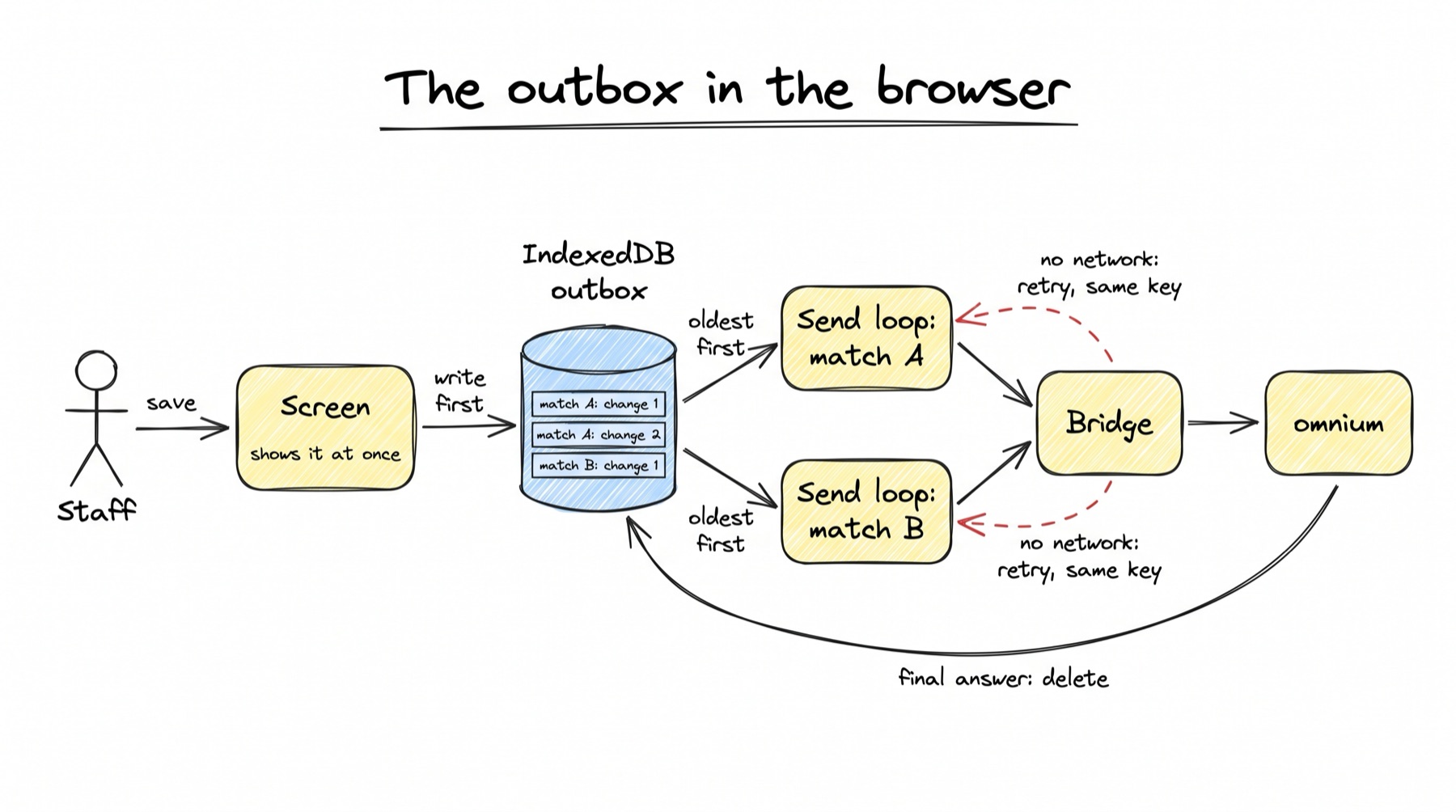
IndexedDB is a small database built into every browser. Unlike memory, it survives a crash, a reload and a new deploy. The outbox is one store in it. This record shape is copied from the design doc:
// design doc, Section 7, "On the device" (new; not in the code)
// IndexedDB database "omnium", one store per app origin (the iframe has its own origin)
// store "outbox", key: change id (the command key, made once)
type Pending = {
  key: string;              // crypto.randomUUID(), sent on every retry (Section 4, C2)
  subject: string;          // "fixture:01a0..." - the queue is per subject
  code: string;             // "results.edit_side"
  input: object;
  saw?: Saw;                // the version the screen showed (Section 4, C3)
  createdAt: string;        // order within a subject
  tries: number;
  state: "waiting" | "sending";
};
// index on (subject, createdAt): the next change to send for each subject
The rules for the outbox:
| Rule | Why |
|---|---|
| Write the row before sending | A crash between the click and the send loses nothing |
| The key is made once, when the row is written | Every retry is the same command to the server |
| One send loop per subject, oldest first | Changes to one match land in the order they were made (Section 4, C12) |
| Subjects run in parallel | A slow match never holds up another |
| Delete on accepted, duplicate, refused or conflict | These are final answers |
Keep on try_again or a network error | Wait 0.2 s, 0.4 s, 0.8 s and so on, up to 30 s, plus a little randomness; send the same key again |
| A conflict pauses that subject's loop | The changes behind it may depend on it (Section 4, L5); the person chooses first |
| Show the waiting count; show "Offline, N changes waiting" | When the browser reports no network, or a send has failed for 5 s |
The design names the file packages-ts/omnium-bridge/src/outbox.ts (new). A sketch of one send loop, written from the rules above; it is not code from either repo:
// sketch of the agreed send loop (F2); names are illustrative
async function drain(subject: string) {
  for (;;) {
    const next = await outbox.oldest(subject);         // index (subject, createdAt)
    if (!next) return;
    try {
      const answer = await bridge.command(next.code, next.input,
                                          { key: next.key, subject: refOf(subject) });
      if (answer.conflict) { pause(subject, next, answer); return; }  // V3
      await outbox.delete(next.key);                    // accepted, duplicate, refused
      report(next, answer);                             // saved / refused state
    } catch (networkError) {
      await sleep(backoff(next.tries++));               // 0.2 s doubling to 30 s, plus jitter
    }
  }
}
Showing a change before it is confirmed (agreed, F3)
The console already uses TanStack Query, and every watched read lives in its cache. An optimistic update shows the change on screen before the server confirms it. TanStack Query does this with a mutation's onMutate step. The agreed flow:
| When | What the screen does |
|---|---|
| Send | Save a snapshot of the cached record. Write the new value into the cache, so every place that shows it updates. Mark the field as sending. |
| Accepted | The server's record replaces the cache. Tick for 2 s. |
| Refused | Put the snapshot back. Show the server's sentence under the field. |
| Conflict | Keep the snapshot. Show both values and ask. |
// sketch of F3 with the TanStack Query v5 API; not code from the repo
const edit = useMutation({
  mutationFn: (body: FixtureEdit) => change.send("results.edit_fixture", body, saw),
  onMutate: async (body) => {
    await client.cancelQueries({ queryKey: ["fixture", event, id] });
    const before = client.getQueryData<Fixture>(["fixture", event, id]);
    client.setQueryData(["fixture", event, id], { ...before, ...body }); // shows at once
    return { before };
  },
  onError: (_error, _body, context) => {
    client.setQueryData(["fixture", event, id], context?.before);       // roll back
  },
});
Today only the medal table drag works this way, and it rolls back by re-reading (MedalsPage.tsx:102-115).
The five field states (agreed, V2 and V3)
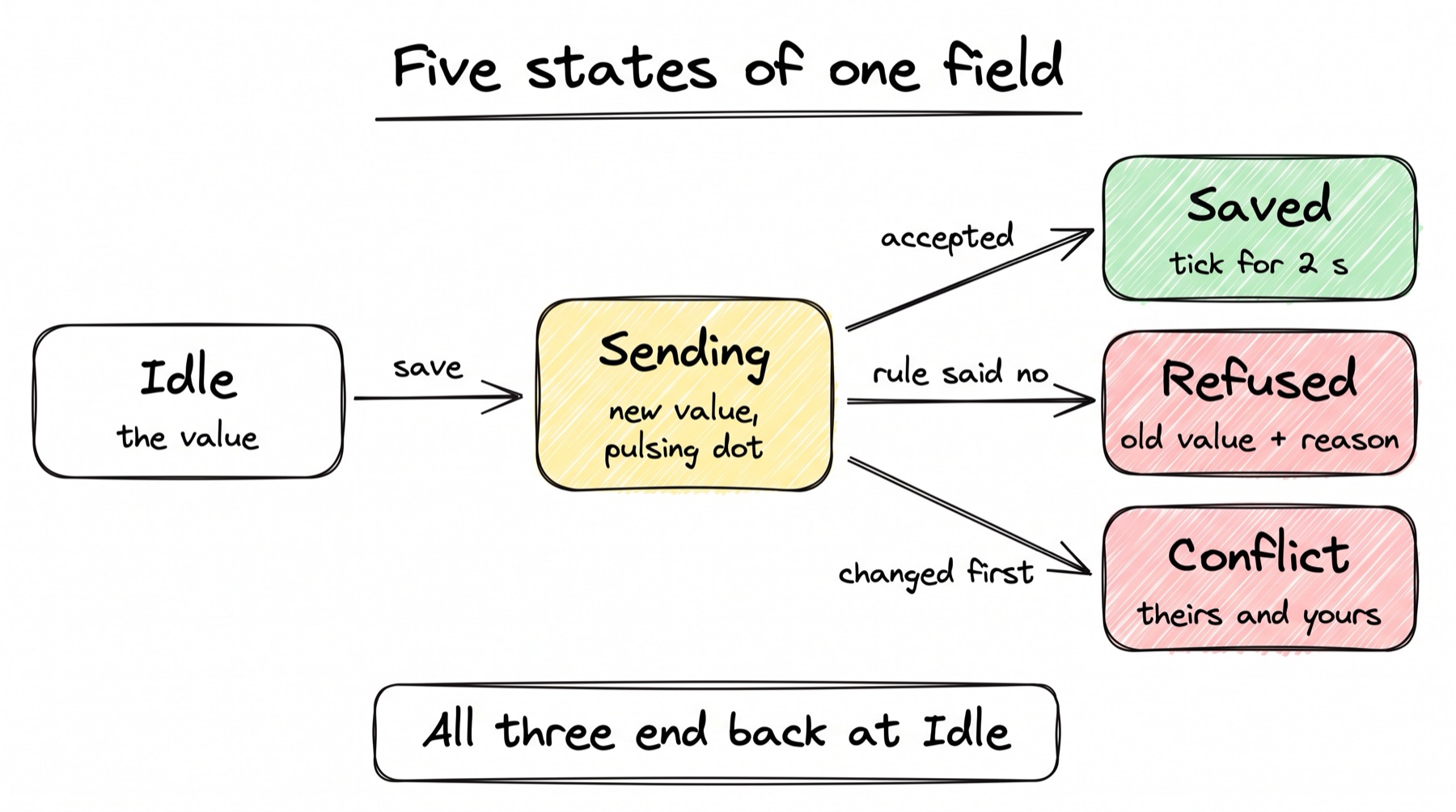
| State | What it looks like | When |
|---|---|---|
| Idle | The value | Nothing pending |
| Sending | The new value, a small pulsing dot | In the outbox, not answered yet |
| Saved | A tick for 2 seconds, then idle | Accepted or duplicate |
| Refused | The old value back, the reason in red under the field | A rule said no (Section 4, L18) |
| Conflict | Both values: theirs (who, when) and yours, with Keep theirs and Use yours | Someone changed it first (Section 4, C3) |
A refusal reads like this: "A medal needs a finished match. Men's 100m Final is still LIVE." It appears next to the field, not only in a toast. Today every refusal is a toast in the corner (FixturePage.tsx:172).
Keep theirs drops your change and shows their value. Use yours sends your value again. The design doc does not spell out how that second send is built; it must carry saw = their version, or it would conflict again.
The hooks that carry the states, as the design doc gives them:
// packages-ts/omnium-bridge/src/react.ts (new hooks; design doc, "The hooks")
type ChangeState = "idle" | "sending" | "saved" | "refused" | "conflict";

function useChange(subject: Subject) {
  // returns send(code, input, saw) and, per field, its state and message
  // send(): writes to the outbox, applies onMutate to the query cache, returns at once
  // the outbox answer updates the state: saved (tick 2 s), refused (sentence), conflict (theirs + yours)
}

function useField<T>(id: string, serverValue: T, version: number) {
  // draft, setDraft, focused; while focused or dirty, serverValue changes do not touch draft
  // changedMeanwhile = serverValue !== startedFrom; save() sends saw = version it started from
}
Today react.ts has useWatch, useRead and useCommand (react.ts:61-138). The console uses its own live() helper instead. The design keeps useCommand for old apps.
The typing guard (agreed, V4 and F4)
Today a text field copies the server value into its draft every time the value changes:
// omnium-console/src/pages/FixturePage.tsx:902-903
const [draft, setDraft] = useState(value);
useEffect(() => setDraft(value), [value]);
If Priya saves the score while Asha is typing, the live push changes value, and Asha's half-typed text is replaced. The start field does the same (FixturePage.tsx:949-952).
One place already guards against this. The medal box keeps its draft while it has focus:
// omnium-console/src/pages/MedalsPage.tsx:1143-1145
useEffect(() => {
  if (!typing) setDraft(String(value));
}, [value, typing]);
The agreed useField makes that the rule for every field, and adds two things the medal box lacks:
- Each field reports focus and unsaved text to a small registry: its id and the value it started from.
- A live push still updates the cache. A field in the registry keeps its draft and compares the new value with the one it started from. If they differ, it shows "Changed to 3-1 by Priya while you typed".
- On save, the field sends
saw= the version it started from. If the record moved, the server answers conflict, and the five states take over.
Live updates (built, and agreed changes in F5)
The panel's host re-reads affected watches one after another today:
// packages-ts/omnium-bridge/src/host.ts:215-229 (trimmed)
for (const [watchId, watch] of [...this.watches]) {
  if (!everything && watch.depends && !watch.depends.some((area) => touched.has(area))) continue;
  try {
    const { value, depends } = await this.readWith(watch, watch.name, watch.params); // waits each time
    watch.depends = depends;
    const text = JSON.stringify(value);
    if (!this.watches.has(watchId) || text === watch.last) continue;
    watch.last = text;
    this.post({ type: "push", watchId, value });
  } catch { /* kept: the next change reads it again */ }
}
A page with 7 watches waits for 7 reads in a row. F5 changes this loop to read 4 at a time.
The server ends each stream after 10 s, because the ECS Service Connect proxy cuts every request at 15 s:
# packages/core/src/omnium_core/settings.py:263-267
# Not 0 by default because of AWS: admin-api sits behind ECS Service Connect,
# whose proxy ends EVERY request after 15 seconds unless the service sets a
# timeout. A stream cut there shows "Reconnecting" and can drop a change.
# Ending first, cleanly, avoids both. Set 0 once that timeout is lifted.
stream_max_seconds: float = Field(default=10.0, ge=0)
F5 raises the proxy timeout for the admin service and sets stream_max_seconds to 0. The stream loop itself reads domain_event once a second (_POLL_SECONDS = 1.0, packages/admin/src/omnium_admin/routers/bridge.py:766).
The user asked for more: when two scorers work one match, the second screen should update as soon as the first changes something. Section 8 takes that as its main target: about half a second, pushed with the change itself rather than a re-read. See Bridge and live updates.
Pages that open fast (agreed, V6 and F6)
Every page is imported eagerly today, so the first screen downloads all of them:
// omnium-console/src/App.tsx:6-14
import OverviewPage from "./pages/OverviewPage";
import MedalsPage from "./pages/MedalsPage";
import IntegrationsPage from "./pages/IntegrationsPage";
// ... PlayersPage, PlayerPage, SchedulePage, FixturePage, RunsPage, FeedsPage
The agreed change uses React.lazy, which loads a page's code only when its route opens:
// sketch of F6; not in the repo
const MedalsPage = lazy(() => import("./pages/MedalsPage"));
// <Suspense fallback={<Loading what="Opening…" />}> around <Routes>
| Piece | Today | Agreed |
|---|---|---|
| Code per page | One file: 594.39 KB JS (186.49 KB gzipped) and 111.96 KB CSS, measured with vite build on a laptop, 7 Oct | Each route loads its own code plus the shared kit |
| Long lists | Schedule folds big days behind "Show all" (SchedulePage.tsx:820-827); Players shows 50 per page (PlayersPage.tsx:45) | A virtual list (TanStack Virtual) draws only the rows on screen, about 30, whether the day has 90 units or 900 |
| Next page | Fetched on open | Data for a likely next page (a hovered row) fetched in advance |
A virtual list keeps only the visible rows in the page and swaps them as you scroll. The comment at SchedulePage.tsx:823-825 explains why it is needed: drawing all 895 rows at once "takes long enough to feel like a freeze". The new wrapper is omnium-console/src/components/VirtualList.tsx (new), used by Schedule, Players and Runs.
The scorecard grid and the keyboard (agreed, V7)
The scorecard entry screen is new (omnium-console/src/pages/ScorecardPage.tsx, new). It is a grid: players down, the sport's line keys across. The columns come from the sport's line catalogue (Section 6, P1), so the same screen serves cricket, football or any sport set up in settings. No sport is written into the screen.
| Key | Where | Does |
|---|---|---|
| Tab | Grid | Next cell to the right |
| Enter | Grid | Next row down |
| Escape | Grid | Undo the cell |
| Paste | Grid | Fill cells from a spreadsheet |
| Ctrl+K | Anywhere | Search for any match, player or page |
| ? | Anywhere | List the shortcuts |
| S | Match page | Save |
| E | Match page | Edit the next side |
Each row saves as one results.set_line command through the outbox, and ticks as it saves. A 22-row cricket scorecard is 22 commands, in order. results.set_line does not exist yet; Section 5 defines it. Ctrl+K and "?" live in omnium-console/src/components/Palette.tsx (new).
Today the console has no shortcuts. Its only key handlers are Escape for drawers and dialogs (ui.tsx:407-410) and Enter or Escape in a field. The cricket desk is the only app with number keys (CricketApp.tsx:701-704).
Role-aware screens (agreed, V8)
The session already says whether this person may write:
// packages-ts/omnium-bridge/src/protocol.ts:83-84
/** Who the log will say it was. */
user: { name: string; role: string | null; canWrite: boolean };
The host refuses a command from a viewer (host.ts:308-310): "Your account can look but not change anything." But the console never reads canWrite (no match for it in omnium-console/src on 7 Oct). So a viewer sees every edit button and is refused only on save. V8 makes viewers get read-only pages with a note: "You can view, not change." Actions like approving a release appear only to those allowed. Section 13 owns the role rules.
One shared UI kit (agreed, V9)
The console's components live in one file, omnium-console/src/components/ui.tsx: Button, IconButton, Stat, Chip, Card, Tabs, Empty, Problem, Note, Loading, Skeleton, Drawer, useToast, useConfirm. The theme uses the Outfit font (src/styles/tokens.css:97). V9 moves this kit, the icons and the tokens into a new package, packages-ts/omnium-ui. The console and the desks both use it. The desks move into the omnium repo as apps/desks and deploy like the console.
Files the design changes
| File | New or today | Change |
|---|---|---|
packages-ts/omnium-bridge/src/outbox.ts | new | The device queue (F1, F2) |
packages-ts/omnium-bridge/src/app.ts | today | command() takes the key from the outbox instead of making one (line 332) |
packages-ts/omnium-bridge/src/host.ts | today | refresh() re-reads 4 watches at a time (F5) |
packages-ts/omnium-bridge/src/react.ts | today | New hooks useChange() and useField() |
packages-ts/omnium-ui | new | The shared kit (V9) |
omnium-console/src/lib/bridge.ts | today | send() goes through the outbox |
omnium-console/src/lib/api.ts | today | editFixture sends one results.edit_fixture (V10) |
omnium-console/src/pages/FixturePage.tsx | today | TextField and StartField use useField; five field states |
omnium-console/src/pages/ScorecardPage.tsx | new | The entry grid (V7) |
omnium-console/src/App.tsx | today | Routes with React.lazy (F6) |
omnium-console/src/components/Palette.tsx | new | Ctrl+K and the "?" list |
omnium-console/src/components/VirtualList.tsx | new | TanStack Virtual for Schedule, Players, Runs |
packages/flows/src/omnium_flows/results/commands.py | today | New results.edit_fixture and results.set_line |
desks (boxing-scoring-ui, laptop only) | today | Moved into the repo as apps/desks; send through the outbox |
| ECS Service Connect (infra) | today | Raise the admin service's per-request timeout; set stream_max_seconds to 0 |
results.edit_fixture (agreed, V10)
packages/flows/src/omnium_flows/results/commands.py holds ten commands today: set_name, set_start, set_venue, set_status, set_result, set_medal_event, add_side, edit_side, remove_side, hand_back (lines 114-198). Each changes one thing. results.edit_fixture (new) takes several fields of one match in one input and runs as one command. One lock, one transaction: saved whole, or not at all. The match page shows one sending mark and one tick for it.
Speed tests (agreed, F7)
"Fast" is a Playwright test in a real browser, run in CI. From the design doc:
// omnium-console/tests/speed.spec.ts (new, Playwright, real Chrome)
test("a score edit shows at once and is confirmed quickly", async ({ page }) => {
  const t0 = Date.now(); await page.getByLabel("Score").fill("3"); await page.keyboard.press("Enter");
  await expect(page.getByTestId("field-score-state")).toHaveAttribute("data-state", "sending");
  expect(Date.now() - t0).toBeLessThan(100);
  await expect(page.getByTestId("field-score-state")).toHaveAttribute("data-state", "saved", { timeout: 1000 });
});
The targets: click to screen under 100 ms, save to tick under 1 s on a local server, page open under 2 s. The console has Playwright tests today (omnium-console/tests/, nine spec files including bridge.spec.ts and medals.spec.ts), but none measures speed, and none covers a dropped, slow or conflicting change.
Tests that prove it
| Test | Proves |
|---|---|
| Go offline in the browser, make 6 changes, come back | All 6 saved in order, none twice (V1) |
| Reload the page with 3 changes waiting | All 3 sent after the reload (F1) |
| A rule refuses a change | Old value back, the sentence under the field (V2) |
| Two browsers change the same score | The second sees both values and chooses (V3) |
| Type in a field while another browser saves it | The draft stays; the notice shows (V4) |
| A 900-unit day | Scrolling stays smooth; the first rows show within the page target (V6) |
| Type and paste a 22-row scorecard | 22 commands, all saved, in order (V7) |
| Open as a viewer | No edit controls (V8) |
| Save three fields of a match where the third is refused | Nothing saved (V10) |
Build order
The design doc gives this order. Each step fixes something on its own.
- The outbox and
useChangein the bridge package; the console'ssend()goes through it. Fixes retries and lost changes. useFieldon every text field. Fixes typing being overwritten.results.edit_fixture;editFixturesends one command.- The five field states on the match page, then Medals and Players.
React.lazyroutes and the virtual list.- The proxy timeout and parallel re-reads.
- Viewers get read-only screens.
- The scorecard grid, Ctrl+K and shortcuts.
- The shared UI package; the desks move into the repo on it.
When things go wrong
Every case ends with no change lost, none saved twice, and the person knowing where they stand. This is the agreed behaviour. What happens today is in the worked example above and in "Built today, or still to build" below.
| What goes wrong | What the person sees | What happens underneath |
|---|---|---|
| The network drops for 2 minutes during scoring | A bar: "Offline. 6 changes waiting, they will send when you are back." They keep working. | Each change is in the outbox with its key. On reconnect they go out in order, one at a time per match (V1). |
| The browser crashes, or the page reloads with changes waiting | On reopening: "3 changes from before were sent" | The outbox is in IndexedDB, not memory. It drains on start (V1). |
| The server is slow (2 s) | The change shows at once with the sending mark; the tick comes later | The click is answered on the device; the outbox waits for the server (V2). |
| A rule refuses the change | The old value comes back with the reason under the field | A refused answer with the Section 4 sentence; the row is deleted (V2). |
| Two operators change the same score | "Priya set this to 3-1 at 12:04. Keep theirs / Use yours" | A conflict answer with the current value; nothing saved until they choose (V3). |
| Someone changes a score while I type in it | My text stays; a notice: "Changed to 3-1 by Priya while you typed" | The live push does not touch a field with focus or unsaved text (V4). |
| A viewer opens a match | A read-only page, no edit buttons, "You can view, not change" | The screen reads canWrite from the session (V8). |
| The console is deployed while a page is open | "A new version is ready" with Reload; nothing waiting is lost | The outbox survives the reload; a new bundle loads only when asked (V1). |
| The change stream drops | A small "Reconnecting" only after 5 s; the screen catches up | The stream resumes from its last place (Section 4, L9; V5). |
| A day with 900 units opens | The first rows show at once; scrolling stays smooth | Only the rows on screen are drawn (V6). |
| A full cricket scorecard is typed by hand | 22 rows, Tab across, Enter down, paste from a sheet; each row ticks | One results.set_line per row, through the outbox (V7). |
| Several fields of a match edited at once | One sending mark, one tick | One command for all fields: saved whole or not at all (V10). |
Decisions
All 17 decisions are agreed (design doc, closed 6 Oct 2026).
| # | Decision | In plain words |
|---|---|---|
| V1 | One shared client in the bridge package sends every change: key made once, saved on the device before sending, one at a time per match in order, retried with the same key until answered. Every app uses it. | A dropped network, a crash or a reload never loses a change and never sends one twice. |
| V2 | A change shows at once with a sending mark; accepted shows a tick; refused puts the old value back with the server's sentence under the field. | Clicks feel instant, and a refusal is read where it happened, not only in a toast. |
| V3 | A conflict shows both values (theirs with who and when, and yours) and asks the person to choose. | Nobody's change disappears without them knowing. |
| V4 | A field with focus or unsaved text never takes a live update; it shows a notice that the value changed. | Today another person's save can replace a half-typed score. |
| V5 | The panel re-reads affected screens in parallel, and the stream's 10-second cut-off is removed by fixing the proxy timeout. | Other screens catch up in about a second, without gaps. |
| V6 | Each page loads only its own code; long lists draw only what is on screen. Targets: click under 0.1 s, save confirmed under 1 s, page open under 2 s, checked in tests. | The console stays fast on a 900-unit day and with 10,000 players. |
| V7 | A scorecard entry grid (columns from the sport's line catalogue, Tab and Enter, paste from a sheet, one command per row), Ctrl+K search, and listed shortcuts on every screen. | A full scorecard is typed in minutes. |
| V8 | Screens follow the role: viewers see read-only pages; restricted actions appear only to those allowed. | No one meets a button that will refuse them. |
| V9 | One shared UI package for the console and the scorer apps; the desks move into the repo and deploy like the console. | One look, one way of working, and no app that lives only on a laptop. |
| V10 | Editing several fields of a match at once sends one command. | Saved whole or not at all. |
| F1 | The outbox lives in IndexedDB, keyed by the command key, indexed by subject and time; written before sending, deleted on any final answer. | A change survives a crash, a reload and a deploy. |
| F2 | One send loop per subject, in order; subjects in parallel; backoff with randomness up to 30 s; a conflict pauses that subject's loop. | Order is kept where it matters, and nothing waits on another match. |
| F3 | Optimistic display through TanStack Query's onMutate: snapshot, write to the cache, roll back on refusal. | Every place that shows the value updates at once, and undoes cleanly. |
| F4 | A field registry protects focus and unsaved text from live pushes, and sends saw with the save. | Typing is never overwritten, and a real clash comes back as a conflict. |
| F5 | The host re-reads affected watches 4 at a time; the stream's 10 s cut-off is removed by raising the proxy timeout. | Other screens update in about a second, with no gap every 10 s. |
| F6 | Routes load with React.lazy; long lists use a virtual list; likely next pages are fetched in advance. | Pages open fast, whatever the size of the day. |
| F7 | Speed targets are Playwright tests in a real browser, run in CI. | "Fast" is checked on every change, not hoped for. |
Built today, or still to build
| Piece | Today | Agreed design | Status |
|---|---|---|---|
| Apps in an iframe, bridge protocol v1 | Built: AppFrame.tsx:66, :155; protocol.ts:8 | Kept | Built today |
| Command key | Made per call, never reused (app.ts:332); server checks it (engine.py:119-122) | Made once in the outbox, reused on every retry | Partly built |
| Retries | None (main.tsx:33) | Same key, 0.2 s doubling to 30 s, with jitter | Agreed, to build |
| Outbox in IndexedDB | None (only the theme is in localStorage, theme.ts:18) | outbox.ts, one loop per subject | Agreed, to build |
| Optimistic display | Only the medal drag (MedalsPage.tsx:102-115); desks show taps at once | onMutate on every change | Partly built |
| Five field states | Spinner on Save, toast on error | Idle, sending, saved, refused, conflict | Agreed, to build |
| Conflict answer | None for commands; only app state has a version check | Both values and a choice (Section 4, C3) | Agreed, to build |
| Typing guard | Medal box only (MedalsPage.tsx:1143-1145); text fields reset (FixturePage.tsx:903) | useField registry on every field | Partly built |
| Parallel re-reads | One by one (host.ts:215-229) | 4 at a time | Agreed, to build |
| Stream cut-off | 10 s (settings.py:267) | 0, after the proxy timeout is raised | Agreed, to build |
| Code splitting | One 594 KB file (App.tsx:6-14 eager imports) | React.lazy per route | Agreed, to build |
| Virtual lists | None; folded days, paged players | TanStack Virtual for Schedule, Players, Runs | Agreed, to build |
| Scorecard grid, Ctrl+K, shortcuts | None | ScorecardPage.tsx, Palette.tsx | Agreed, to build |
| Role-aware screens | Host refuses viewers (host.ts:308-310); console shows every control | Read-only pages for viewers | Partly built |
| One command for several fields | One per field (api.ts:773-788) | results.edit_fixture | Agreed, to build |
| Shared UI package | ui.tsx inside the console only | packages-ts/omnium-ui | Agreed, to build |
| Desks in the repo | Laptop only, not in git | apps/desks, deployed like the console | Agreed, to build |
| Speed tests in CI | Playwright tests exist, none for speed | speed.spec.ts in CI | Agreed, to build |
Numbers
| Number | What | Source |
|---|---|---|
| 594.39 KB (186.49 KB gzipped) | The console's one JS file | vite build of omnium-console on a laptop, 7 Oct 2026 |
| 111.96 KB (21.29 KB gzipped) | The console's one CSS file | Same build |
| 0 | Retries of a change | From the code: main.tsx:33 |
| 30 s | How long the app waits for any answer | From the code: app.ts:36 |
| 5 s | How long the app waits for hello | From the code: app.ts:35 |
| 250 ms | Wait after a change before re-reading watches | From the code: host.ts:196 |
| 1 s | How often the stream reads domain_event | From the code: bridge.py:766 |
| 10 s | How long one stream stays open | From the code: settings.py:267 |
| 15 s | The ECS Service Connect proxy's cut | From the comment at settings.py:263-265 (not checked in AWS) |
| 50 | Players per page | From the code: PlayersPage.tsx:45 |
| 895 rows | A big day's schedule that felt like a freeze | From a code comment: SchedulePage.tsx:824 |
| under 0.1 s, under 1 s, under 2 s | Click, save-to-tick, page-open targets | Design doc, V6 (targets, not measured) |
| 4 | Watches re-read at a time | Design doc, F5 |
| 0.2 s to 30 s | Retry wait, doubling, with jitter | Design doc, F2 |
| 2 s | How long the tick shows | Design doc, field states |
| about 30 | Rows a virtual list draws | Design doc, F6 (estimate) |
Read next
- Bridge and live updates: how the second screen sees a change, and the half-second target from Section 8.
- Commands and the workflow engine: what happens to a command after the panel sends it: key, lock, check, apply, answer.
- Writing a workflow in code: the backend side of a command, line by line.
- Monitoring, logs and alerts: how a failed send or a stuck screen gets noticed.